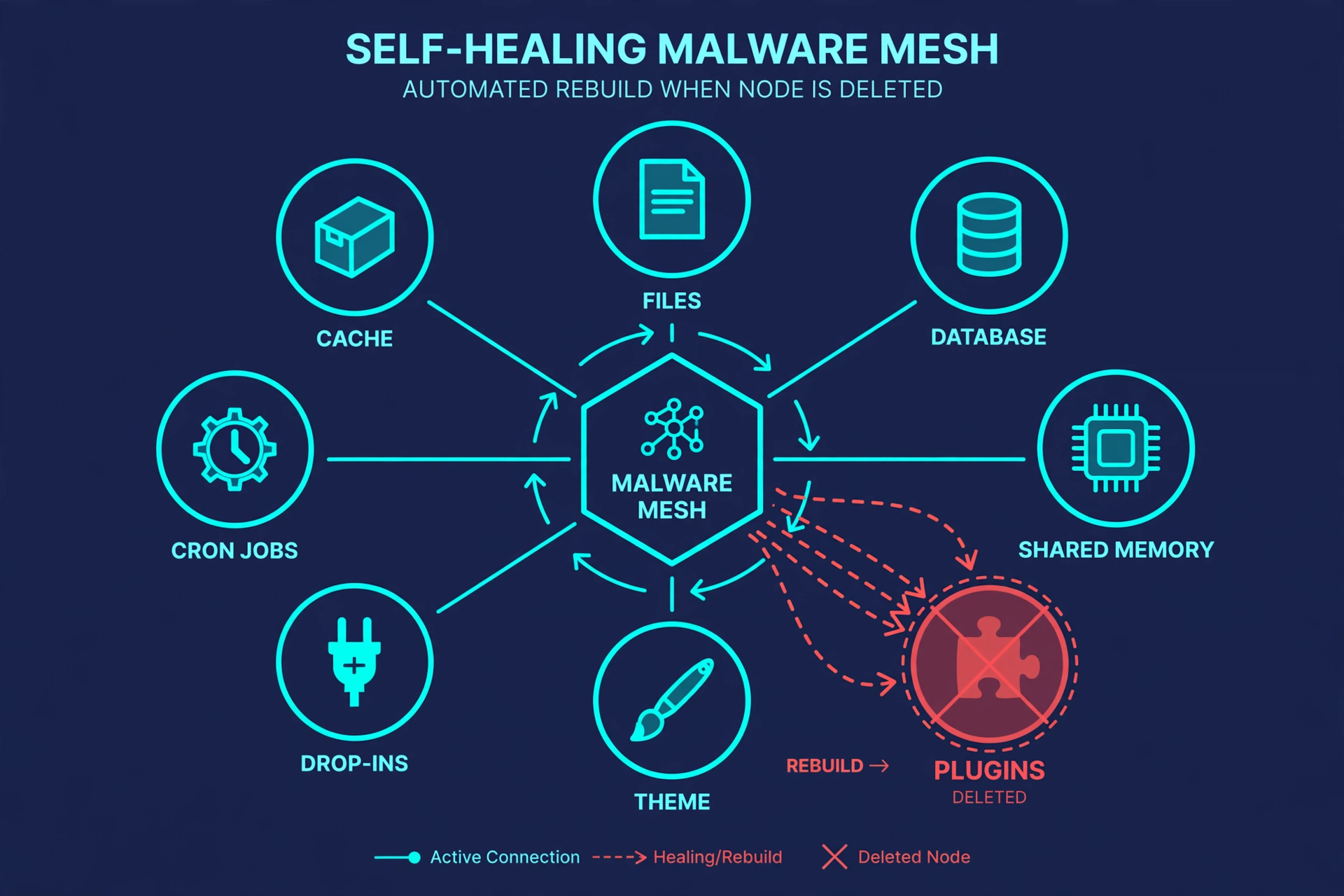
On October 1, 2026, security firm Sucuri disclosed a WordPress backdoor with an unsettling property: deleting it doesn’t kill it. Codenamed SC (after the “SC_” markers found in its injected code), it hides copies of itself in at least eight places across your files, your database, and your server’s memory — and any surviving copy rebuilds all the others the next time a page loads.
Sucuri researcher Gabriel Barbosa put it bluntly: “Delete the plugin and a drop-in rewrites it. Delete the drop-in and the theme rewrites it. Clean every file on disk, and the next page load restores the whole set from the database or from a shared-memory segment. The result is a circular system with no single point you can remove to stop it.”
If you run a WordPress site, here’s what SC is, how to check whether it’s on yours, and — critically — what to do if you find it, because the usual “find the bad file and delete it” approach does not work here.
What makes SC different
Most WordPress malware is a file somewhere it shouldn’t be. You find it, delete it, clean up, and move on. SC was built specifically to survive that. Sucuri describes it as a “self-healing mesh”: the payload lives in at least eight locations at once, spread across files, the database, and shared memory, and every one of those locations can regenerate the rest.
It also talks to its operators over the Ethereum blockchain — it carries a list of roughly 20 public Ethereum RPC gateways, so blocking one command-and-control address just routes it through another public one. There is no single server to block.
One honest unknown: researchers have not yet determined how attackers first get in. There is no plugin or theme to blame yet, and no CVE attached to SC itself. Don’t let anyone sell you a story about the entry point — as of the disclosure, nobody knows.
Where SC hides (the eight persistence points)
You don’t need to memorize this list, but it helps to understand why cleanup is so hard. Sucuri documented these components:
- .user.ini — a server config file that sets PHP’s auto_prepend_file directive, so a malicious loader runs before WordPress itself on every request.
- Loader files in wp-content — e.g. c1b12371.php, which includes a hidden dot-prefixed file (like .c1b12371.php) in the same directory.
- Abused WordPress drop-ins — wp-content/db.php and advanced-cache.php carrying the entire backdoor payload in compressed, Base64-encoded form. If the malicious plugin goes missing or gets too small, these decode and redeploy it.
- Your active theme’s functions.php — another recovery copy.
- A fake plugin called hyper-engine-kit — installed twice, once as a must-use plugin and once as a regular plugin.
- Cron hooks with randomized names — keeping redeployment on a schedule.
- Payload copies in the database — random-looking rows in tables like wp_options.
- Server shared memory — the copy you can’t see from WordPress at all.
Everything is obfuscated with a substitution cipher and stripped of readable function names, which makes manual review painful.
What SC can do once it’s in
This isn’t a defacement prank. Sucuri reports SC can:
- Hide itself from the plugin management screen, so the WordPress dashboard looks normal.
- Create hidden administrator accounts — full control of your site.
- Steal administrator session tokens — hijacking your logged-in session.
- Execute PHP code and download additional payloads.
- Inject JavaScript into your pages — on a store, that means payment-card skimmers at checkout.
- Deactivate security software trying to remove it.
How to check your site for SC markers
You can do the first checks yourself in about 15 minutes. You need access to your WordPress dashboard and your hosting account’s file manager (cPanel, Plesk, or similar).
- Check your user list. Go to Users → All Users in your dashboard and look for any Administrator account you don’t recognize. SC creates hidden admin accounts — this is the single fastest check, and it catches many infections, not just SC.

- Look for the telltale files. In your hosting file manager, check for: a .user.ini file in your site’s root folder containing auto_prepend_file (legitimate sites rarely have this); odd files in wp-content/ with random hex-style names (the observed example was c1b12371.php) or hidden files starting with a dot; wp-content/db.php or advanced-cache.php that you didn’t put there (caution: these filenames are also used legitimately by caching plugins — a file with the right name but garbage-looking contents is the red flag, not the name alone); a plugin called hyper-engine-kit — in regular plugins or in wp-content/mu-plugins/ (you didn’t install this; it shouldn’t be there); anything in mu-plugins/ you don’t recognize.
- Search your files for the marker. Many hosts’ file managers have a “search file contents” feature. Search for SC_ across your WordPress files. Hits in files you didn’t write are worth investigating.
- Peek at the database (optional, careful). In phpMyAdmin, browse wp_options for option names or values that look like random strings. Don’t delete anything from the database unless you know what it is — a wrong delete can break your site.
- Run a security scan. A reputable scanner (Wordfence, Sucuri’s free SiteCheck) will flag known-bad files and is the easiest option if the file-manager spelunking feels over your head. Our WordPress security guide walks through setting up ongoing scanning.
One honest limitation: the shared-memory copy can’t be checked from WordPress or your file manager at all — that’s server-level, and only your host can look at it. Which brings us to the important part.
Found something? Don’t just delete files
This is the one thing to take away from this post: deleting SC’s files does not remove SC. The surviving copies — in the database, in shared memory, in the drop-ins — will rebuild everything you deleted on the next page load. Hand-deleting files can actually make things worse by giving you false confidence.
Here’s what to actually do:
- Put the site in maintenance mode so visitors (and customers) aren’t exposed while you work.
- Restore from a known-clean backup — one from before the infection. This is the fastest reliable fix, and it’s exactly why backups are step 4 of our security guide.
- No clean backup? Get professional help. Sucuri, Wordfence Care, or your host’s malware-removal service deal with multi-location infections like this routinely. This one is genuinely beyond DIY — say so honestly rather than risk a half-cleaned site.
- After cleanup, rotate everything: change the salts/keys in wp-config.php, change all passwords (WordPress admins, hosting account, FTP/SFTP, database), and delete any unknown admin users.
- Re-scan to confirm it’s actually gone — then scan again in a week.

How to make this less likely
There’s no patch for SC because there’s no vulnerable plugin to patch — the entry point is still unknown. What you can do is shrink the surface attackers use to get in at all:
- Keep WordPress core, themes, and plugins updated — most infections start with a known flaw in outdated software.
- Keep working backups — the one thing that turns a disaster into an inconvenience.
- Delete plugins and themes you don’t use — unused code is just attack surface.
- Use strong passwords and two-factor authentication on every admin account.
- Give accounts the minimum role they need — not everyone needs to be an Administrator.
All of this is covered step by step in How to Secure Your WordPress Website: A Beginner’s Step-by-Step Guide. If you haven’t worked through it yet, this disclosure is a good reason to.
Sources: The Hacker News — WordPress Backdoor Rebuilds Itself, ThaiCERT — SC Malware advisory, Sucuri research, BitNewsBot — 8 persistence methods breakdown.