SiteGround and Hostinger are the two names that come up in almost every “best WordPress hosting” conversation for beginners — and for good reason. They’re both affordable, both beginner-friendly, and both will run a WordPress site perfectly well.
But they win in very different ways: Hostinger wins on price, while SiteGround wins on support. Pick the wrong one for your situation and you’ll pay for it — literally, at renewal time.
This guide compares them head to head on the things that actually matter when you’re starting out: real pricing (including renewals), speed, support, backups, and ease of use.
Quick verdict: Choose Hostinger if your budget comes first and you’re comfortable learning as you go. Choose SiteGround if you’d rather pay more for genuinely excellent support that holds your hand.
Pricing note: Hosting prices change constantly and depend on the billing term you choose (the cheapest prices require long commitments). The numbers below were accurate as of September 2026 — always check the pricing page before you buy.
Side-by-side comparison
| Hostinger | SiteGround | |
|---|---|---|
| Best for | Beginners on a budget | Beginners who want top-tier support |
| Entry plan | Premium | StartUp |
| Entry price (intro) | $2.99/mo (48-month term) | $2.99/mo (12-month term) |
| Entry price (renewal) | ~$10.99/mo | $17.99/mo |
| Websites on entry plan | Up to 3 | 1 |
| Storage on entry plan | 20 GB SSD | 10 GB SSD |
| Free domain (first year) | Yes | No (~$15–20/yr extra) |
| Free SSL | Yes | Yes |
| Backups on entry plan | Weekly | Daily, with free self-restore |
| Staging environment | Unlimited plan and up | GrowBig plan and up |
| Control panel | hPanel (custom, very simple) | Custom panel (clean and tidy) |
| Server technology | LiteSpeed + LSCache | Google Cloud + SuperCacher |
| Support | 24/7 live chat | 24/7 live chat + phone |
| Money-back guarantee | 30 days | 30 days |
Pricing: where the real difference hides
The headline prices look identical — $2.99 per month on both. The real story is what happens when those introductory deals end, and how long a term you have to buy to get them.
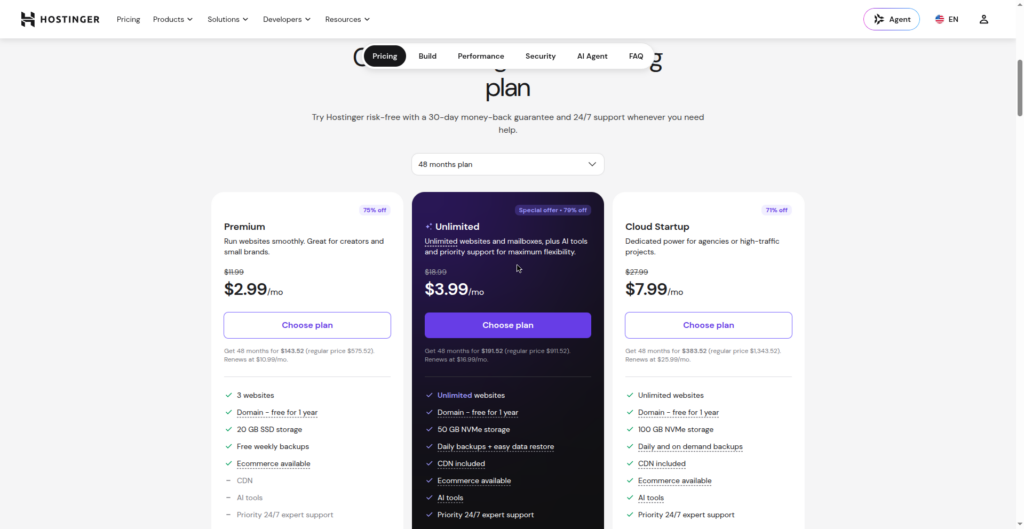
Hostinger’s best price requires a 48-month prepayment. Pay $2.99/mo for four years up front (about $144 total for the entry Premium plan). The catch: when that term ends, the Premium plan renews at roughly $10.99/mo. Shorter terms are available but cost more per month.
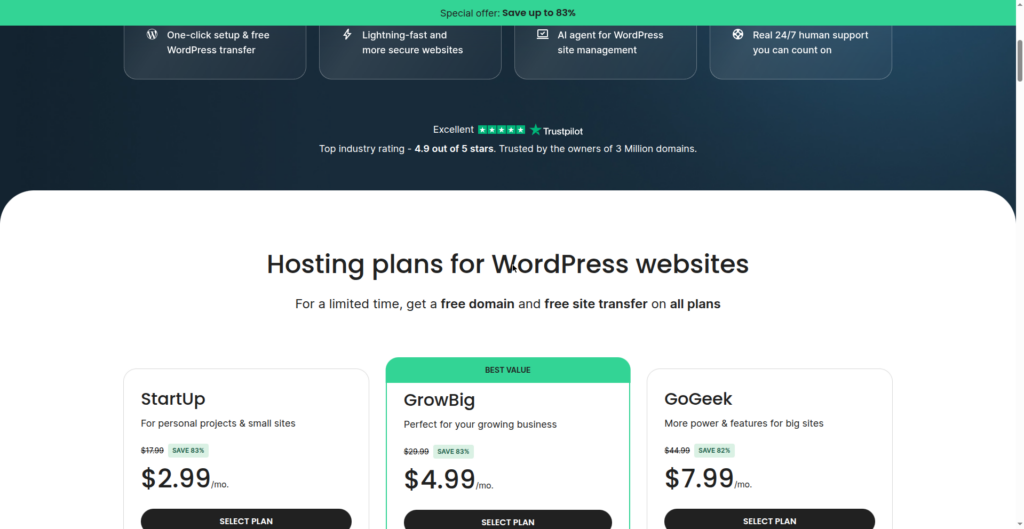
SiteGround’s best price requires a 12-month term. The StartUp plan starts at $2.99/mo — but it renews at $17.99/mo, six times the intro price. SiteGround doesn’t even offer 48-month terms, so you can’t lock in the low rate for as long.
Run the math over four years on the entry plans and Hostinger costs roughly a fifth of what SiteGround costs — a difference of several hundred dollars. If long-term cost is your main concern, this is not close: Hostinger wins comfortably.
But price isn’t everything. Here’s what SiteGround’s extra money buys you.
Round 1: Ease of use
Hostinger: hPanel is the simplest hosting dashboard a beginner can start with — clean, uncluttered, and designed so you never have to touch anything intimidating.
SiteGround: Their custom panel is clean and tidy too, with a guided setup wizard that walks you through getting WordPress installed.
Both hosts offer one-click WordPress installation, so getting your site live takes just a few minutes either way.
Winner: Hostinger, by a small margin.
hPanel is simply the easiest hosting dashboard a beginner can start with.
Round 2: Speed
- SiteGround runs on Google Cloud infrastructure with its own SuperCacher system — independent tests typically show US response times around 200ms.
- Hostinger uses LiteSpeed servers with LSCache — tests typically show US response times around 470ms.
- Both include free SSL and a CDN option (SiteGround’s is built in on all plans; Hostinger’s routes through Cloudflare).
- For a brand-new site with modest traffic, you will not feel the difference in daily use.
Winner: SiteGround.
Round 3: Support
SiteGround: 24/7 live chat and phone support, consistently rated among the best in the hosting industry, and they know WordPress specifically.
Hostinger: 24/7 live chat only — no phone support; helpful and fast for routine questions.
Winner: SiteGround, by a wide margin.
Round 4: Backups and security
SiteGround takes backups daily on every plan with free one-click self-restore.
Hostinger backs up weekly on the entry Premium plan (daily backups start on the Unlimited plan, $3.99/mo intro).
Both include free SSL certificates, malware scanning, and DDoS protection.
Both will migrate an existing WordPress site to them for free.
Winner: SiteGround.
Daily backups with free self-restore on the cheapest plan is a standout feature.
Round 5: The extras beginners actually use
- Free domain — Hostinger includes a free domain for the first year on annual-or-longer plans; SiteGround does not (budget ~$15–20/yr extra).
- Number of sites — Hostinger’s entry plan allows up to 3 websites; SiteGround’s StartUp allows exactly one.
- Storage — Hostinger gives you 20 GB on the entry plan vs SiteGround’s 10 GB.
- Staging — SiteGround on GrowBig and up; Hostinger includes it on the Unlimited plan and up.
Winner: Hostinger, for the free domain, 3 sites, and 20 GB storage on the cheapest plan.
Who should choose Hostinger?
Pick Hostinger if:
- Your budget is the deciding factor — especially long-term renewal costs.
- You want a free domain for the first year.
- You’ll run up to three websites.
- You’re comfortable troubleshooting with tutorials and live chat.
- You want double the storage for image-heavy sites (20 GB vs 10 GB).
Hostinger is the best value in beginner WordPress hosting right now. The tradeoff is weaker support (chat only, no phone) and weekly backups on the cheapest plan.
Who should choose SiteGround?
Pick SiteGround if:
- You want the best support in budget hosting — including phone support.
- Daily backups with free self-restore give you peace of mind.
- You want a managed, hand-holding experience (SiteGround is officially recommended by WordPress.org).
- Your audience is mostly in the US and you want the fastest response times.
- You’re running one site and don’t need 20 GB of storage.
SiteGround is the best experience in beginner WordPress hosting. The tradeoff is real: higher renewals, one site on the entry plan, and no free domain.
What about switching later?
Good news: you’re not locked in forever. Both hosts offer free WordPress migration, and moving a WordPress site between hosts is a routine, low-risk process. A sensible beginner strategy is to start with Hostinger’s cheap 48-month deal, and if your site grows into something serious, move to SiteGround (or a managed host like Cloudways) when the renewal math makes sense.
For the full landscape of beginner options, see our Best WordPress Hosting for Beginners (2026 Compared) guide.
FAQ
Is Hostinger good for WordPress beginners?
Yes. Hostinger’s hPanel is one of the easiest hosting dashboards to learn, it includes one-click WordPress installation, a free domain for the first year, and some of the cheapest long-term pricing in the industry. The main limitations are chat-only support and weekly backups on the entry plan.
Is SiteGround worth the higher price?
For many beginners, yes. You’re paying for industry-leading support (including phone), daily backups with free self-restore on every plan, and slightly faster performance. Whether that’s worth the renewal-price gap depends on how much you value having expert help one call away.
Which is faster, SiteGround or Hostinger?
In published independent tests, SiteGround typically shows faster server response times (around 200ms in the US) than Hostinger (around 470ms). Both are fast enough for a new site, but SiteGround has the measurable edge.
Do SiteGround or Hostinger offer a free domain?
Hostinger includes a free domain for the first year on most plans. SiteGround does not include a free domain — you’ll register one separately for roughly $15–20/year.
Final verdict
There is no universally ‘better’ host here — there’s only the better host for you.
- On a tight budget? Hostinger gives you more of everything for less money: 3 sites, 20 GB storage, a free domain, and the cheapest long-term pricing of any major beginner host.
- Want the safety net? SiteGround gives you the best support in the business, daily backups with free restore, and a polished managed experience — at a price that reflects it.
If we had to pick one for an absolute beginner who just wants their first blog online this weekend: Hostinger, because the money you save is real and the support gap only matters when something goes wrong. But if the idea of troubleshooting alone makes you nervous, SiteGround’s support is worth every penny of the difference.